
Toyota Dashcam Viewer1.4.4 - App Store
You'll be able to see results in few seconds.
Publisher Description


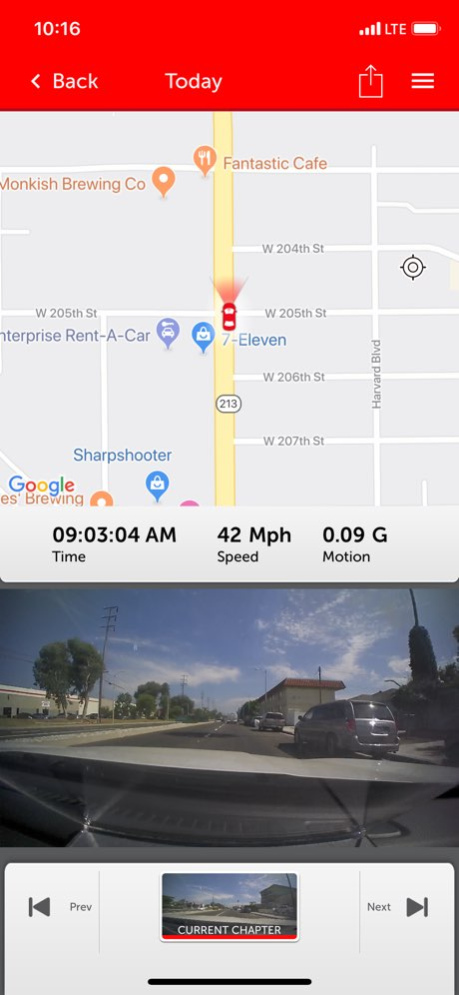

The TOYOTA DASHCAM App allows access to your genuine TOYOTA DASHCAM with your iPhone using the built in WIFI connection. Adjust the camera settings and/or download your memorable videos directly using your iPhone.
App Features:
- View and download your recorded videos directly to your phone
- Adjust camera settings:
. Video quality
. Buzzer noise levels
. Turn ON/OFF Adventure Mode, and adjust SD card’s Adventure Mode memory allocation
. Turn ON/OFF Parking Surveillance Mode, and adjust sensitivity, wake-up modes and surveillance start delay functions
. Live view feature
- For your safety, the app will disconnect from the TOYOTA DASHCAM if vehicle movement is detected. Do not operate your iPhone while vehicle is in motion.
Camera Features:
Your TOYOTA DASHCAM features 5 unique recording modes: 3 automatic modes and 2 manual modes activated using the “ACTION” button:
1) Continuous recording - automatically records when vehicle ignition is on. Never worry about turning on the camera to start recording. When SD card is full, oldest files are automatically overwritten.
2) Automatic Incident recording - if an abnormal shock is detected when driving, camera automatically locks and protects the video file from overwriting for review at a later time. Sensitivity can be adjusted. Maximum of 10 event videos can be protected from overwriting.
3) Parking surveillance - when vehicle is parked with vehicle ignition off, camera automatically wakes up and starts recording if an abnormal shock is detected. Parking surveillance files are locked and protected from overwriting. Sensitivity can be adjusted. Maximum of 10 parking surveillance recordings can be protected from overwriting.
4) Manual Flagged Event recording - capture interesting moments by pressing the “ACTION” button on the camera. The current video segment(s) 12 seconds before and 8 seconds after button activation will be protected. Maximum of 5 manual event recordings can be protected from overwriting.
5) Adventure Mode recording - capture your driving adventures. Press and hold the “ACTION” button on the camera for 1 second to start protecting the recorded videos. The Adventure Mode recording will stop protecting files after maximum time is reached, or when the “ACTION” button is pressed and held again for 1 second. Maximum of 1 hour of Adventure Mode videos can be protected from overwriting.
Open Source Software Used:
https://www.e-iserv.jp/top/driverecorder/DashCamViewer/oss/oss_sp.html?lang=en
Version History Update fixes a connectivity issue with certain iPhones. 1.4.4 01/09/2025 Corrected an unexpected app termination issue with iOS16. 1.3.0 11/18/2022 Fixes an issue with the display language. 1.2.0 03/31/2022 Includes updates for iOS 14 and changes to the privacy policy. 1.1.0 03/30/2021 Updates to Privacy Policy and End User License Agreement. 1.0.9 01/28/2020 Corrected notification translations, and other app optimizations. 1.0.8 12/12/2019 This update fixes an issue with uploading videos to YouTube. 1.0.7 07/21/2019 Added Compatibility with iOS 12. 1.0.6 04/08/2019 Added iOS 12 compatibility. 1.0.5 02/07/2019 Minor bug fixes and an update to Terms of Use & Conditions. 1.0.4 09/04/2018 Added iPhone X support. 1.0.3 04/02/2018 Added fix to maintain compatibility with YouTube updates. 1.0.2 10/27/2017 iOS11 Compatibility Updates 1.0.1 09/22/2017 1.0.0 09/20/2017
About Toyota Dashcam Viewer
The company that develops Toyota Dashcam Viewer is Toyota Canada Inc.. The latest version released by its developer is 1.4.4.
To install Toyota Dashcam Viewer on your iOS device, just click the green Continue To App button above to start the installation process. The app is listed on our website since 2026-10-15 and was downloaded 0 times. We have already checked if the download link is safe, however for your own protection we recommend that you scan the downloaded app with your antivirus. Your antivirus may detect the Toyota Dashcam Viewer as malware if the download link is broken.
How to install Toyota Dashcam Viewer on your iOS device:
- Click on the Continue To App button on our website. This will redirect you to the App Store.
- Once the Toyota Dashcam Viewer is shown in the iTunes listing of your iOS device, you can start its download and installation. Tap on the GET button to the right of the app to start downloading it.
- If you are not logged-in the iOS appstore app, you'll be prompted for your your Apple ID and/or password.
- After Toyota Dashcam Viewer is downloaded, you'll see an INSTALL button to the right. Tap on it to start the actual installation of the iOS app.
- Once installation is finished you can tap on the OPEN button to start it. Its icon will also be added to your device home screen.
Program Details
System requirements
Download information
Pricing
Version History
version 1.4.4
posted on 2026-10-15
Version History Update fixes a connectivity issue with certain iPhones. 1.4.4 01/09/2025 Corrected an unexpected app termination issue with iOS16. 1.3.0 11/18/2022 Fixes an issue with the display language. 1.2.0 03/31/2022 Includes updates for iOS 14 and changes to the privacy policy. 1.1.0 03/30/2021 Updates to Privacy Policy and End User License Agreement. 1.0.9 01/28/2020 Corrected notification translations, and other app optimizations. 1.0.8 12/12/2019 This update fixes an issue with uploading videos to YouTube. 1.0.7 07/21/2019 Added Compatibility with iOS 12. 1.0.6 04/08/2019 Added iOS 12 compatibility. 1.0.5 02/07/2019 Minor bug fixes and an update to Terms of Use & Conditions. 1.0.4 09/04/2018 Added iPhone X support. 1.0.3 04/02/2018 Added fix to maintain compatibility with YouTube updates. 1.0.2 10/27/2017 iOS11 Compatibility Updates 1.0.1 09/22/2017 1.0.0 09/20/2017
version 1.4.4
posted on 2025-01-09
Update fixes a connectivity issue with certain iPhones.
version 1.4.4
posted on 2025-01-09
Jan 9, 2025
Version 1.4.4
Update fixes a connectivity issue with certain iPhones.
version 1.3.0
posted on 2022-11-18
Nov 18, 2022
Version 1.3.0
Corrected an unexpected app termination issue with iOS16.
Disclaimer
Official App Store Link
We do not host Toyota Dashcam Viewer on our servers. We did not scan it for viruses, adware, spyware or other type of malware. This app is hosted by Apple and passed their terms and conditions to be listed there. We recommend caution when installing it.
The App Store link for Toyota Dashcam Viewer is provided to you by apps112.com without any warranties, representations or guarantees of any kind, so access it at your own risk.
If you have questions regarding this particular app contact the publisher directly. For questions about the functionalities of apps112.com contact us.
